Batchy for podcast production

Set a loudness target per episode. A season in one batch job.

Build your voice chain once: high-pass, de-mud EQ, compression and limiting, plus your own plugins. Batchy runs it on every episode, edited in Batchy or elsewhere, and renders each one with your loudness target.

7-day free trial · Email required · No payment required

Podcast Intro.aiff loaded in Batchy with a high-pass filter, EQ, compressor and limiter connected to a WAV output (enlarge)
An example voice chain: high-pass filter, EQ, compression and limiting.
Enlarge screenshot

The example

One voice chain. Every episode. Three delivery files.

Drop the season folder in. Every episode renders to all three outputs.

Input I/Oep014_edit.wavSeason folder
HPF 70 Hz EQ
De-mud EQ EQ
Compressor Dynamics
Limiter Dynamics
  1. −16 LUFS target
    Stereo master Outputep014_master.wavWAV · 24-bit · stereo · −16 LUFS
  2. −16 LUFS target
    Upload file Outputep014_upload.mp3MP3 · 44.1 kHz · −16 LUFS
  3. Summed to mono, −19 LUFS target
    Mono master Outputep014_mono.wavWAV · 16-bit · mono · −19 LUFS · TPDF dither
Loudness is measured to EBU R128 on each output, with a −1 dBTP true-peak safety stage.

Build · Audition · Render

How it works.

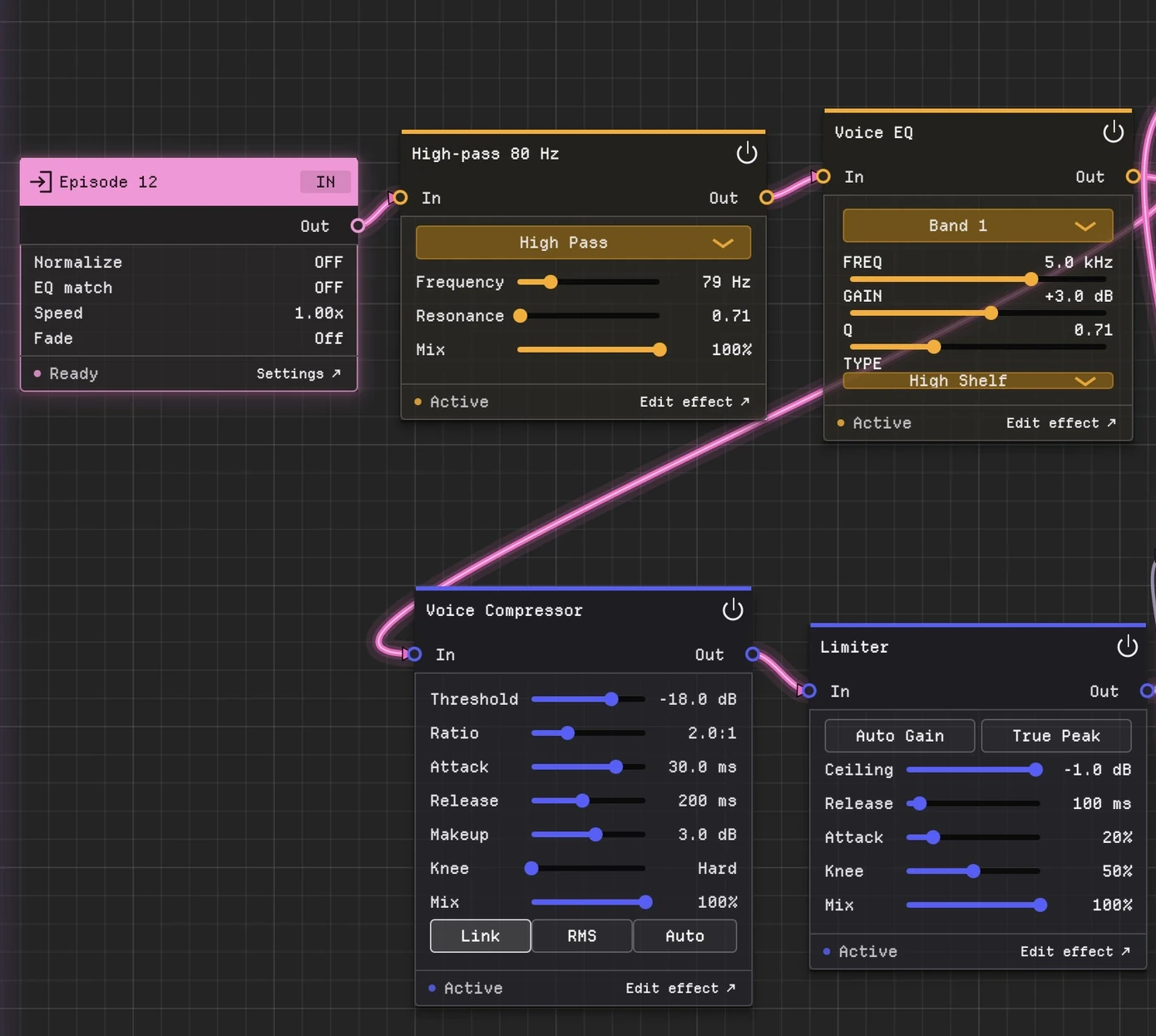
  1. Batchy voice chain for Episode 12: high-pass at 80 Hz, Voice EQ, Voice Compressor and a Limiter in a row (enlarge)
    01 Build

    Build the voice chain.

    High-pass, EQ, compression and limiting, or your favorite plugins, in one graph.

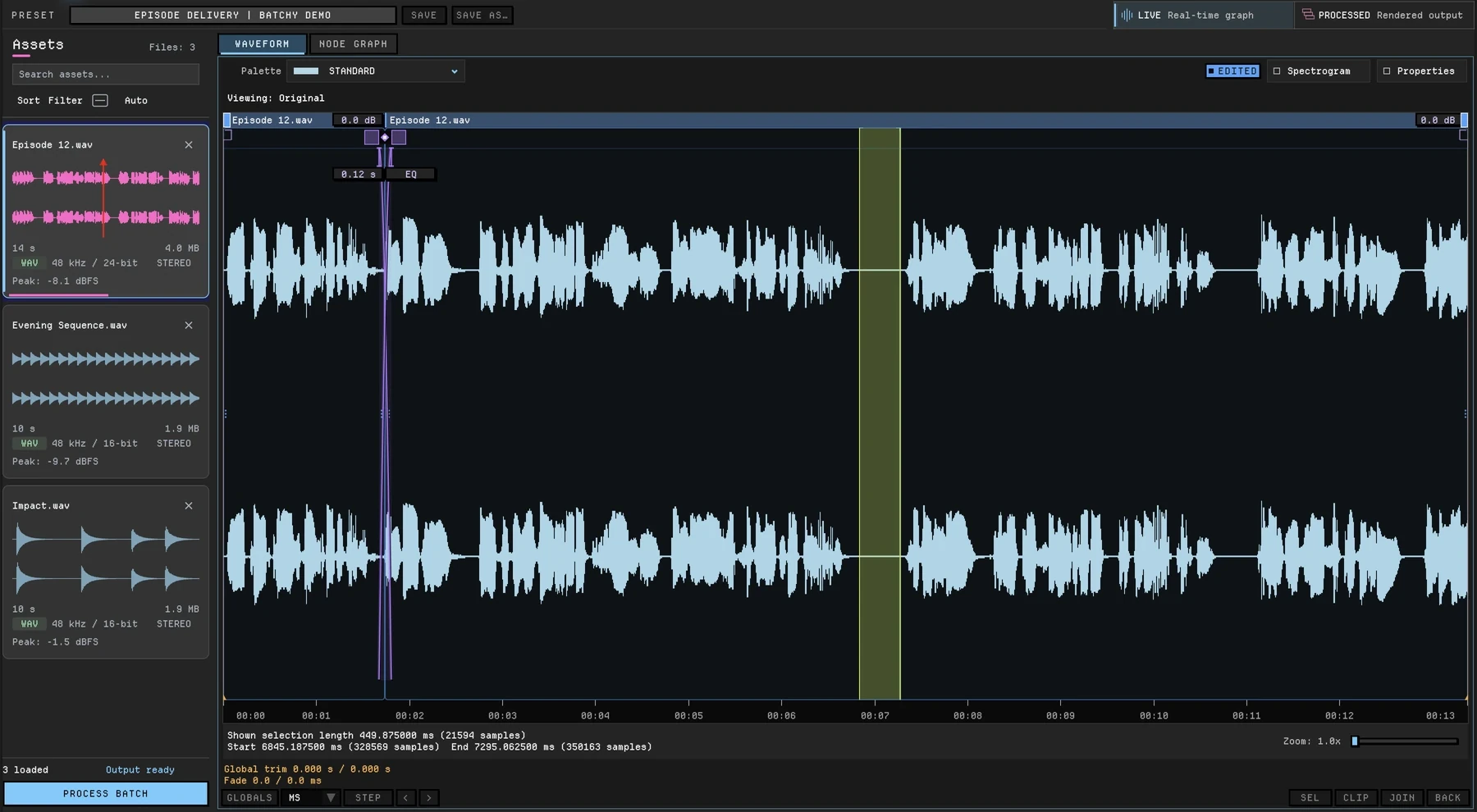
  2. Batchy Live waveform of Episode 12 with a cut, a crossfade and a silenced section (enlarge)
    02 Audition

    Check one episode.

    Switch between live and processed playback, read peak and RMS on the Level Meter, and LUFS in the waveform view.

  3. 03 Render

    Render the season.

    Every episode renders to every output, each with its own loudness target, format and filename.

Specifications

Plugins
VST3 on macOS and Windows; AU on macOS
Built in
30+ audio, metering and visual graph nodes
Loudness
LUFS (EBU R128), RMS or peak targets; −1 dBTP true-peak safety stage on LUFS and RMS; TPDF dither
Formats
WAV, AIFF, FLAC, MP3 and OGG
Resolution
22.05, 44.1, 48, 88.2, 96 and 192 kHz; 16 or 24-bit, or 32-bit float in WAV
Channels
Stereo through 7.1.4 surround panning; mono, stereo and surround conversion
Automation
Command line and headless rendering with JSON render reports
Systems
macOS 12+ (Intel and Apple Silicon); Windows 10/11 (64-bit)
Toolkit

This is one workflow. See the whole toolkit.

Batchy also edits audio in the waveform and covers sound design, music mastering and game audio, with 30+ audio, metering and visual graph nodes, plugin hosting, loudness delivery and the command line.

Everything in one license

$149 once

One-time purchase, not a subscription.

  • Waveform editing, built-in DSP, plugin hosting and batch rendering
  • Loudness targets and the command line
  • macOS + Windows · two machines
  • All 1.x updates included
  • 30-day money-back guarantee
Get Batchy — $149

Secure checkout · License key emailed instantly

Download 7-day free trial

Before you buy.

Is this for editing or finishing episodes?

Both. Cut, trim, crossfade and level the episode in Batchy’s waveform, or bring in an episode you edited elsewhere. Then process it and deliver every format. Batchy does not record audio, has no multitrack timeline and has no built-in noise repair.

What loudness target should I use?

The one in your host’s or network’s delivery spec. Batchy measures integrated loudness to EBU R128 and applies a −1 dBTP true-peak safety stage on LUFS targets.

Can I use my existing plugins?

Compatible VST3 plugins on macOS and Windows, plus AU on macOS. Third-party plugins are separately licensed.

Is there a free trial?

Yes. Download Batchy and select Start 7-day free trial on the welcome screen or in Manage License. Email required to start; no payment required. Downloading does not start the trial. A paid license is required after seven days.

Will it run on my computer?

macOS 12+ on Intel or Apple Silicon, or Windows 10/11 (64-bit). One license covers two machines, on either platform.

Documentation · Ask a question