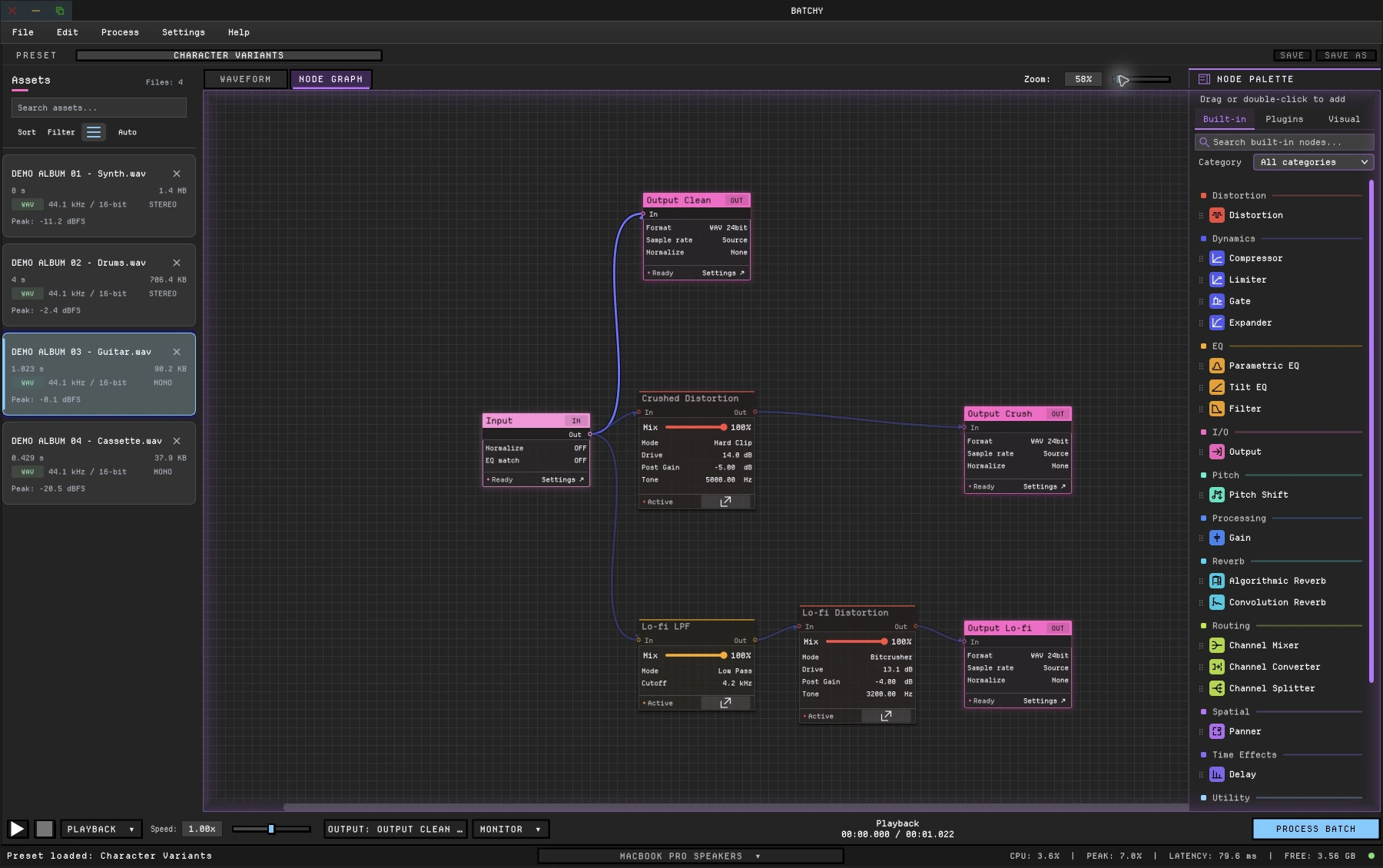
(enlarge)Connect your processors. Create multiple versions in one batch job.Enlarge ↗
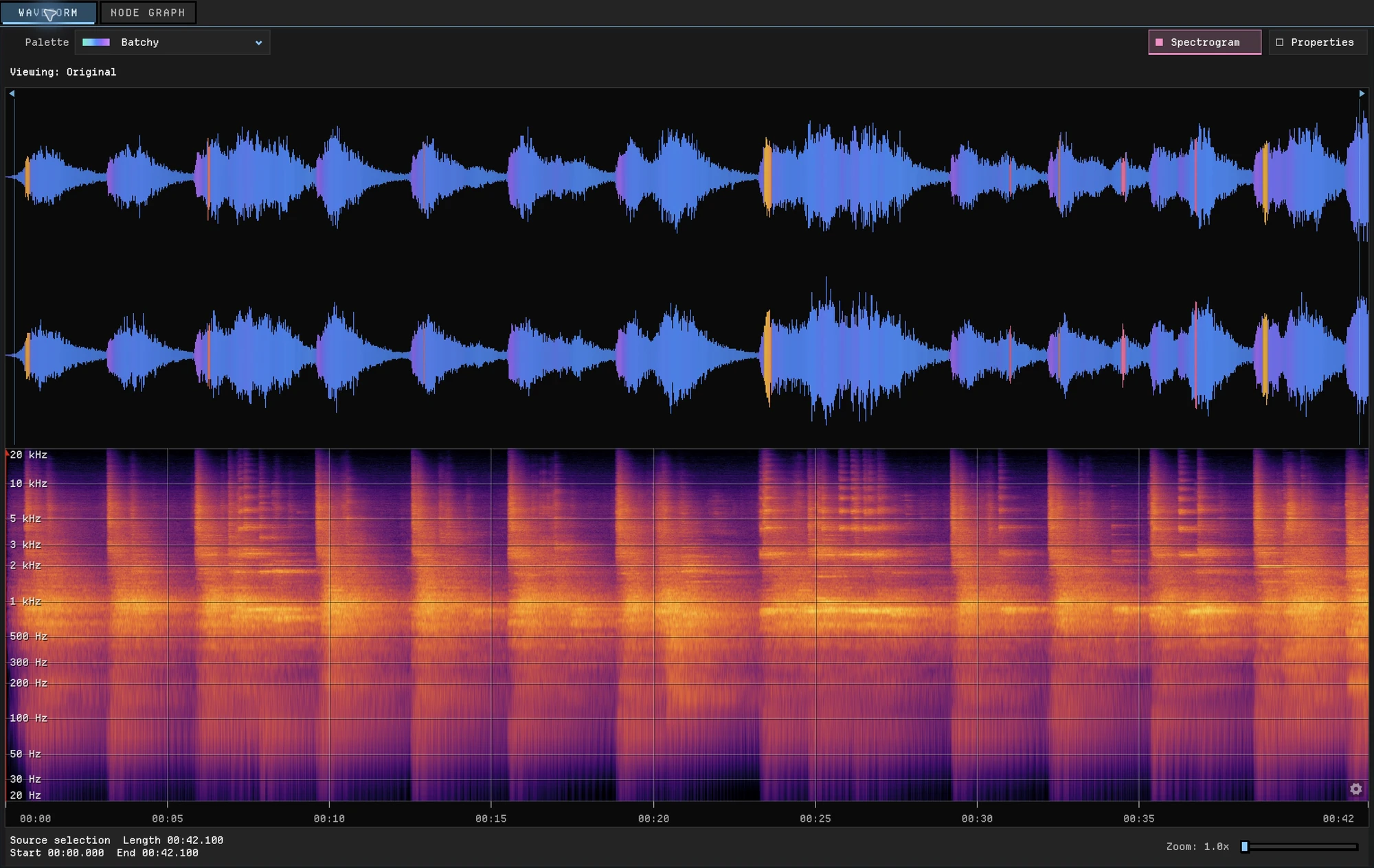
(enlarge)Inspect the waveform and spectral detail together before you export.Enlarge ↗
The full toolkit
Build one graph, audition the processed result, then reuse the same .batchyfx preset in the app, in batch jobs or from the command line.
Creative DSP graphs
Branch, blend and build your own sound.
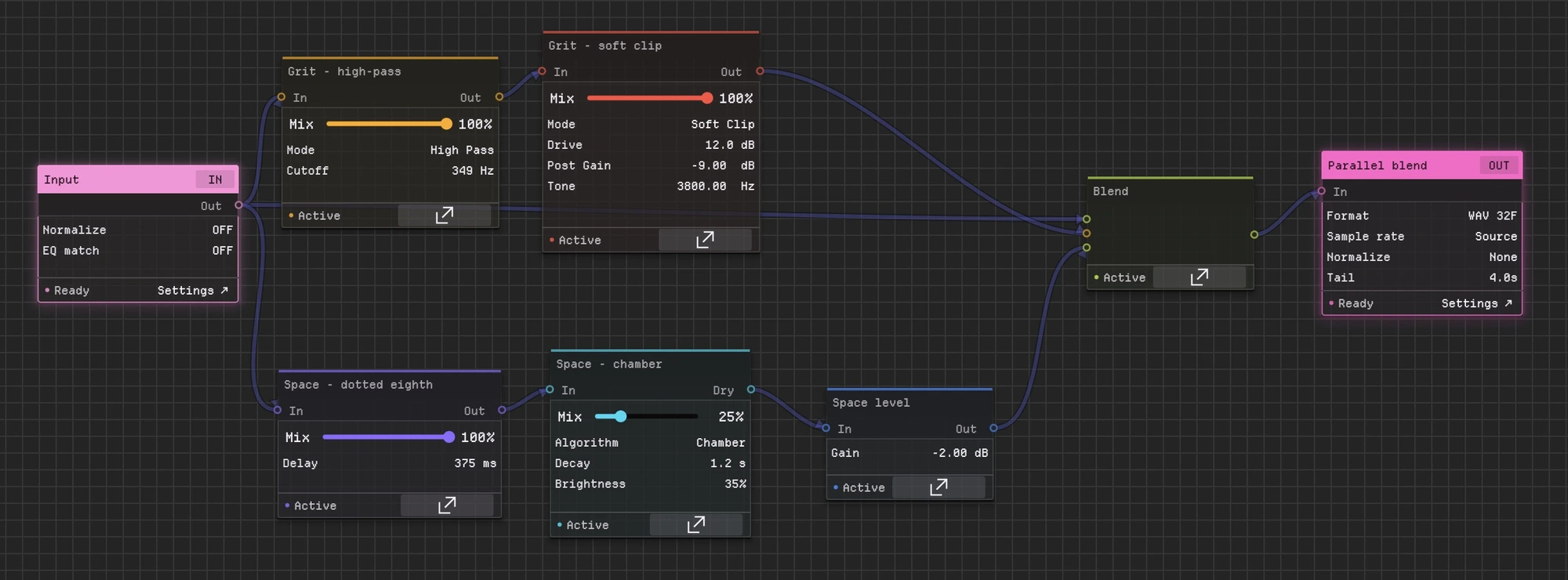
Connect processors in series or in parallel, blend paths in a Channel Mixer, and give each treatment its own output. Save the whole graph as a .batchyfx preset to reopen, share or run on the next folder.
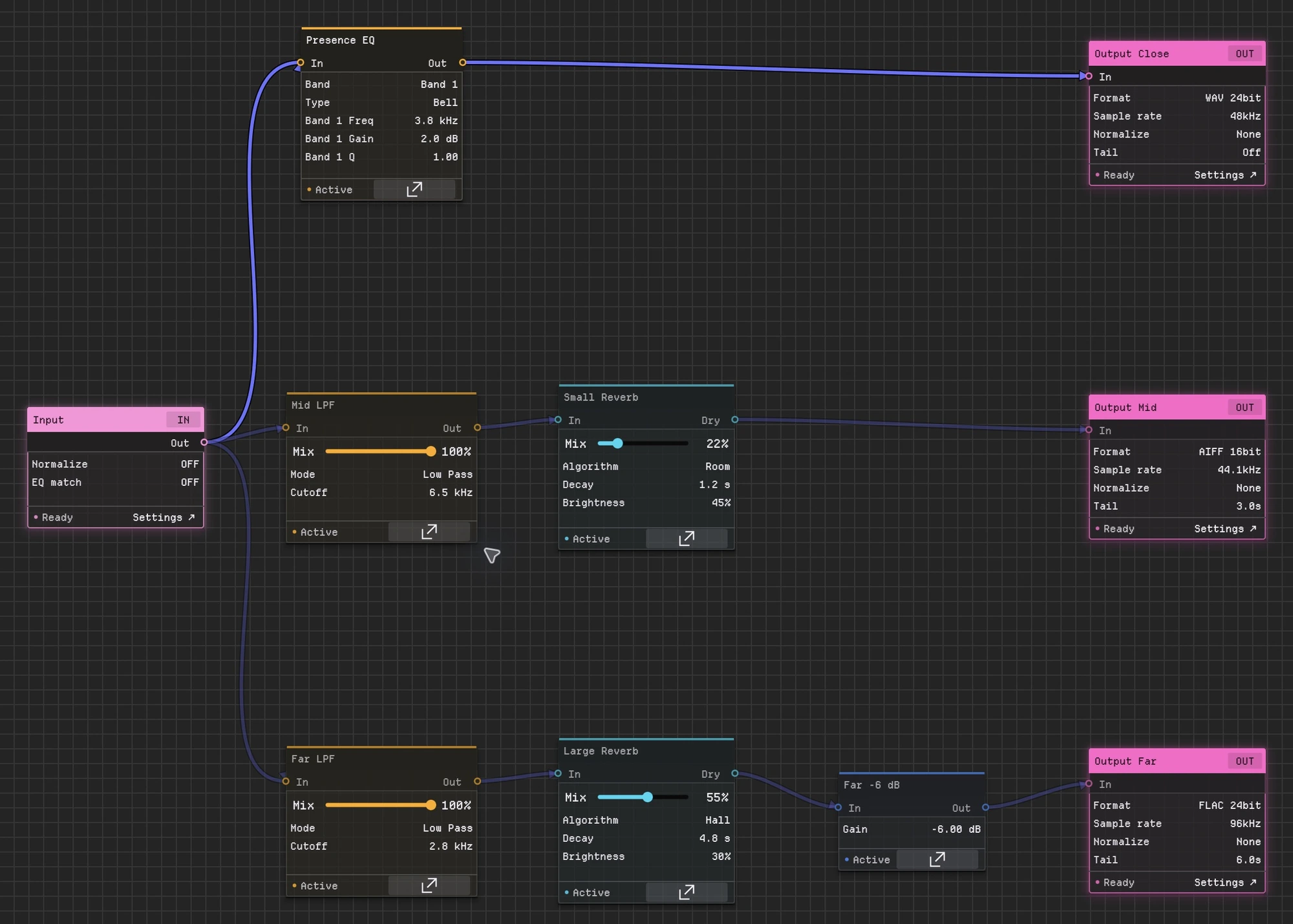
(enlarge)Blend the dry signal with filtered grit and a delay-and-reverb path in a Channel Mixer. (enlarge)Create close, mid and far treatments from the same input using EQ, filters, reverb and gain.
Live / Processed
Hear the result before you export.
Flip between live playback and the processed preview, with waveform and spectrogram views, and check the render before you commit to it. Press A to switch.
Switch from the stereo source to a processed quad result. Distortion and reverb reshape the colored waveforms and spectrogram.
Multi-output rendering
Several differently processed versions of every file.
Add an output wherever the graph needs one. Each output has its own processing path, format, sample rate, bit depth, loudness target and filename, and one batch job renders them all.
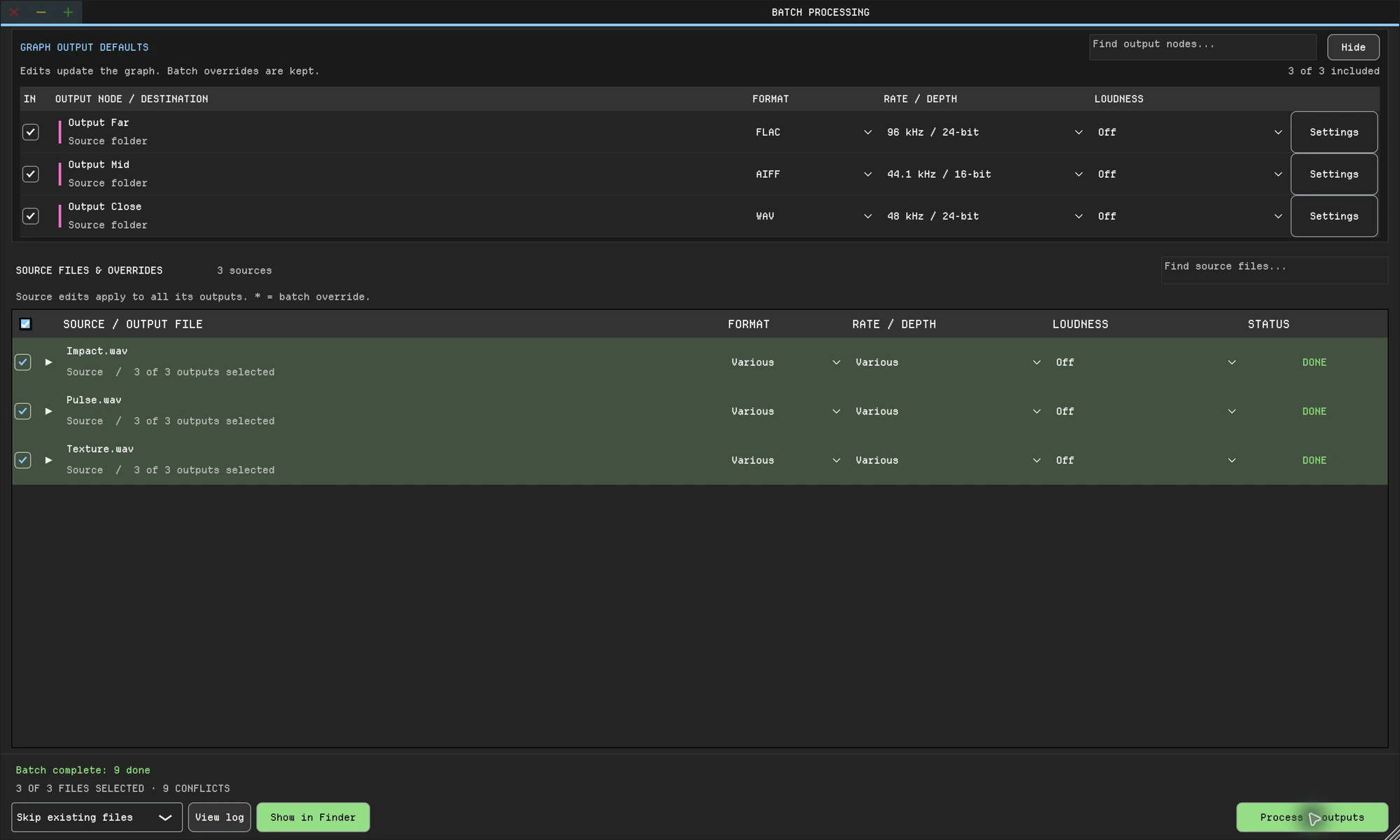
(enlarge)Three files, three distance treatments, nine completed outputs: Close (WAV 48 kHz/24-bit), Mid (AIFF 44.1 kHz/16-bit) and Far (FLAC 96 kHz/24-bit).
Naming control
Folders and filenames that stay predictable.
Path and filename templates fill in client, project and custom tokens such as a revision, so every batch is named and filed the same way.
(enlarge)Set a destination and filename template for each output. Reuse the templates on the next batch.
Plugins + built-in DSP
Your plugins, alongside ours.
Combine VST3 plugins on macOS and Windows, and AU plugins on macOS, with built-in EQ, dynamics, distortion, pitch shift, delay, convolution, reverb and routing. Plugin nodes get gain staging, sidechain routing and latency compensation.
One chain
Input
Your VST3 or AU plugin
Compressor (built in)
Limiter (built in)
Output
Third-party plugins are separately licensed.
Loudness + delivery
Hit the loudness target on every file.
Set LUFS, peak or RMS targets per output. LUFS is measured to EBU R128. LUFS and RMS targets finish with a −1 dBTP true-peak safety stage, and TPDF dither is applied at the final bit depth.
(enlarge)Choose the output format, sample rate, bit depth and loudness target for each output.
CLI + automation
Run the same preset from scripts.
Use the same preset from a terminal, in CI or from your own scripts, with JSON reports, dry runs, fail-fast behavior and per-output overrides.
Native processors, routing tools and meters are included with every license. Pick a category, then select any node to inspect its settings.
Dynamics
Control level, headroom and noise before every render.
Compressor
Shape dynamics with soft-knee compression, parallel blend, channel linking and Peak/RMS detection.
Limiter
Catch peaks with transparent lookahead limiting before export.
Gate
Clean pauses and low-level noise with sidechain input, lookahead and hysteresis.
Expander
Push quiet material down without the hard cutoff of a gate.
EQ & Filtering
Fix tone, match references, or split bands for parallel chains.
Parametric EQ
Use 1-8 bands for surgical cuts, shelves, notches, all-pass filters, and steep cleanup slopes.
Tilt EQ
Brighten or darken material quickly around a chosen pivot.
Filter
Choose low-pass, high-pass, or band-pass filtering with cutoff, resonance, and wet/dry controls.
Band Splitter
Split audio into 2-8 frequency bands for targeted parallel processing.
Reverb & Delay
Add repeatable space and time effects across whole folders.
Convolution Reverb
Apply custom impulse responses with envelope, reverse, pitch, and filtering controls.
Algorithmic Reverb
Choose Hall, Room, Plate, or Chamber algorithms with modulation and multichannel support.
Delay
Create stereo repeats with feedback, filtering, width, and wet/dry control.
Spatial & Routing
Build multichannel chains without leaving the graph.
Panner
Place audio from stereo through 7.1.4 with object and channel panning modes.
Channel Converter
Convert between mono, stereo, surround, and custom channel layouts.
Channel Mixer
Blend multiple inputs into controlled channel outputs.
Channel Splitter
Break multichannel audio into individual paths for separate processing.
Pitch & Character
Shift source material or add controlled edge before export.
Pitch Shift
Shift pitch by semitones or cents while preserving timing and formants.
Distortion
Add saturation, clipping, folding, bitcrushing, rectification, or sine shaping with oversampling.
Analysis & Metering
Check the signal before and after processing.
Spectrum Analyzer
View frequency content with adjustable FFT resolution and pre/post comparison.
Level Meter
Check peak and RMS levels before delivery.
Waveform Scope
Inspect waveform shape over time with zoom and pan.
Vector Scope
See stereo width and phase movement at a glance.
Phase Correlation
Catch polarity and mono-compatibility problems before rendering.
Utility & Output
Finish the chain with level control, normalization, mixing, and file output.
Input
Set source fades, playback speed, pitch, normalization, and EQ matching before the processing chain.
Gain
Trim or boost signal level with a dedicated gain stage.
Normalization
Set peak, RMS, or LUFS targets with smoothed gain changes.
Automatic summing
Connect several paths to one input; Batchy sums them automatically. There is no node to add.
Output
Choose format, bit depth, dithering, and filenames for each delivery.
Use your plugin folder too
Scanned VST3 plugins on macOS and Windows, plus AU plugins on macOS, appear in a separate Plugins tab with gain staging, sidechain routing and latency compensation.
See the workflow
Feature demos
Load and inspect audio
Load a sound and inspect its waveform and spectrogram before rendering.
Specifications
Plugins
VST3 on macOS and Windows; AU on macOS
Built in
30+ audio, metering and visual graph nodes
Loudness
LUFS (EBU R128), RMS or peak targets; −1 dBTP true-peak safety on LUFS and RMS; TPDF dither
Formats
WAV, AIFF, FLAC, MP3 and OGG
Resolution
22.05, 44.1, 48, 88.2, 96 and 192 kHz; 16, 24 or 32-bit float
Channels
Stereo through 7.1.4 surround panning; mono, stereo and surround conversion
Automation
Command line and headless rendering with JSON render reports
Systems
macOS 12+ (Intel and Apple Silicon); Windows 10/11 (64-bit)
 (enlarge)
 (enlarge)