Edit
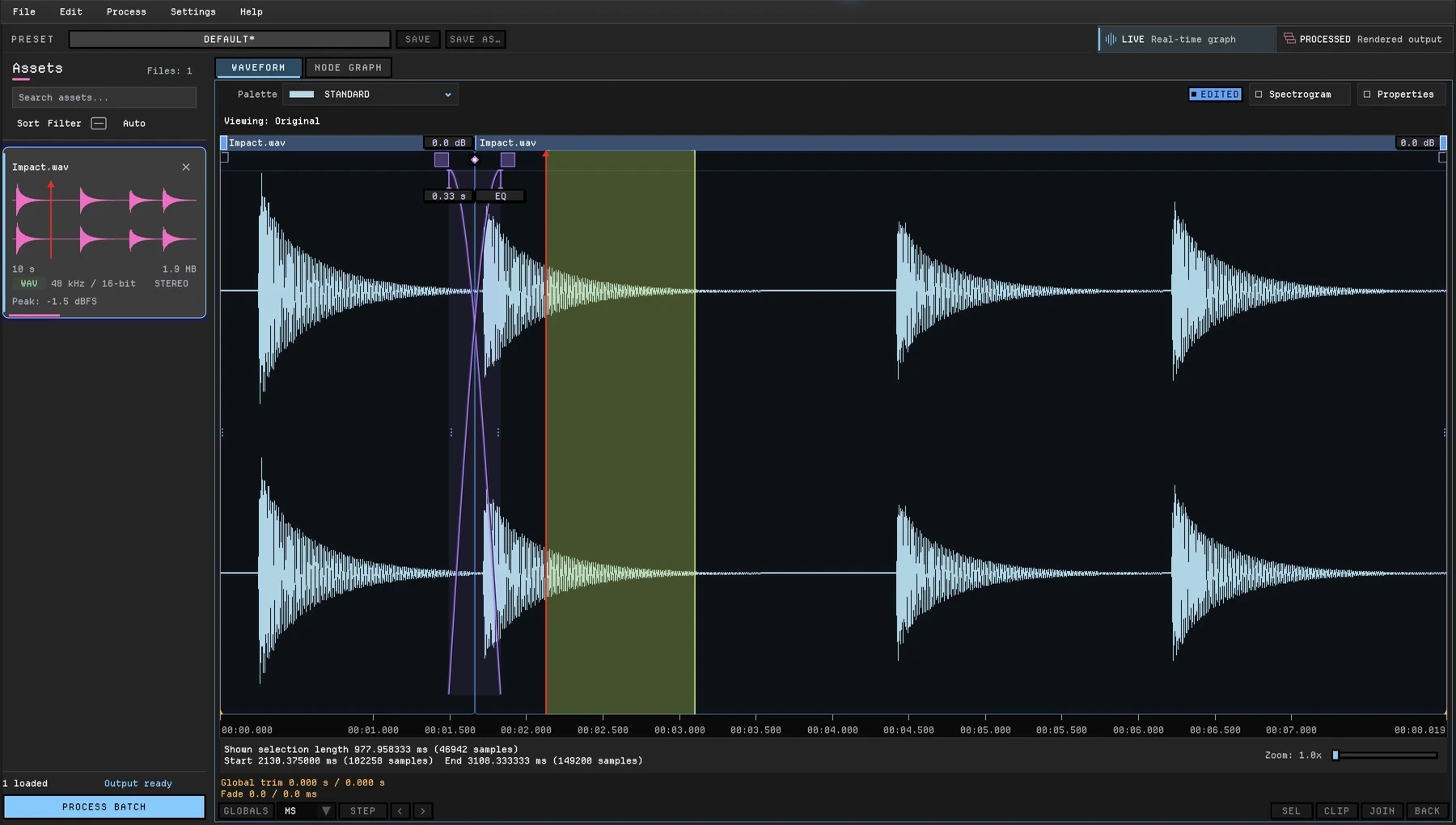
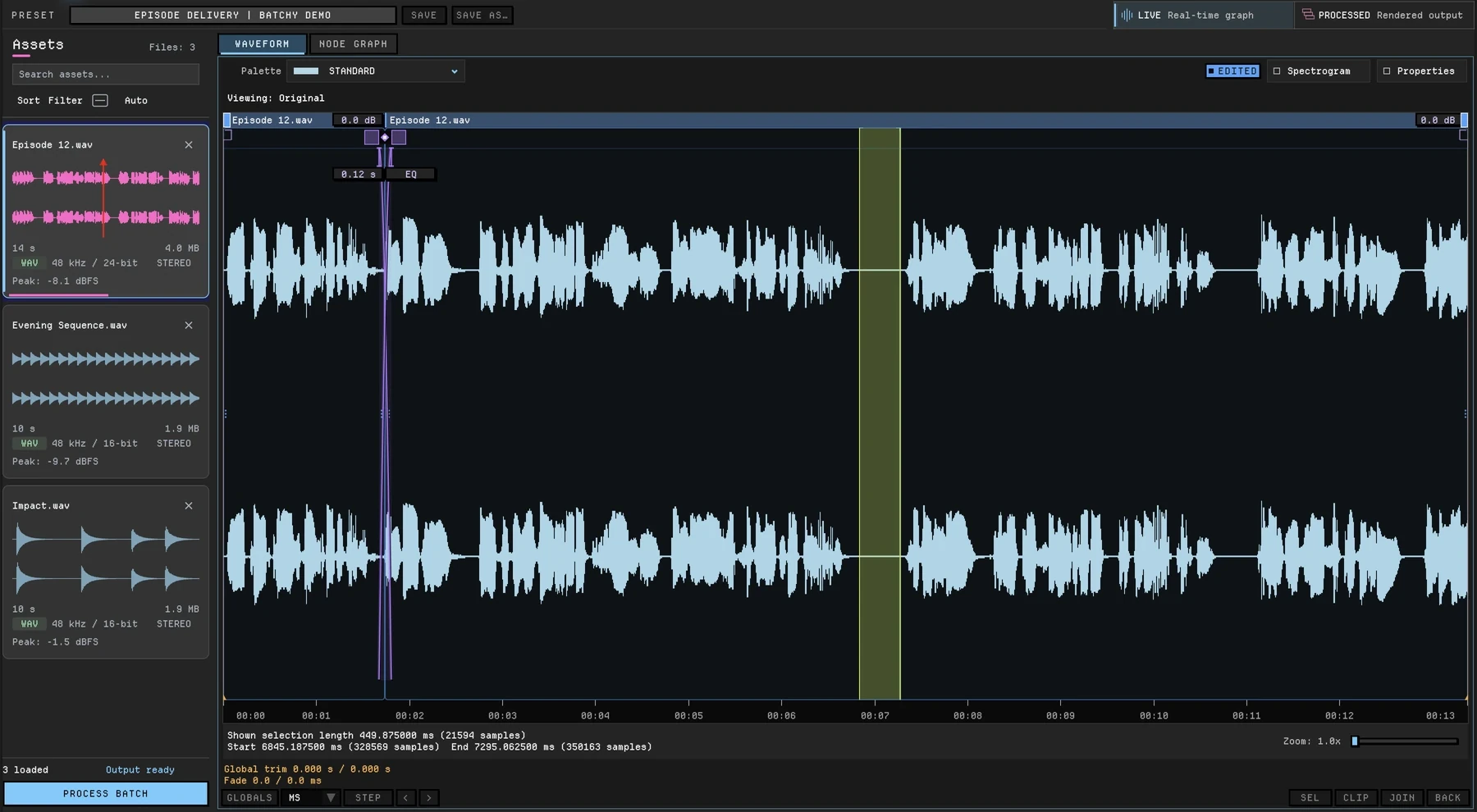
Split, trim, crossfade, fade, reverse and layer with Paste Over, right in the waveform. Non-destructive, with full undo history.
See waveform editingThe audio multi-tool
Cut, layer and crossfade audio right in the waveform. Shape it with branching chains of built-in effects and your VST3 or AU plugins, then deliver every version with its own format, loudness target and filename, for one file or a whole folder.
Buy Batchy — $149Batchy overview · 2:52 · Sound on
What Batchy does
Split, trim, crossfade, fade, reverse and layer with Paste Over, right in the waveform. Non-destructive, with full undo history.
See waveform editingBranch built-in effects and your plugins into parallel chains, split by band or channel, blend paths, and end each path in its own named output.
See the graphCut out unwanted sections and silence a cough in the waveform. In the graph, filter rumble, gate pauses, even out levels or add your own repair plugins.
See the nodesGive every output its own format, sample rate, bit depth, dither, loudness target and filename.
See delivery settingsBatchy does not record audio, has no multitrack timeline and has no built-in noise repair. Bring recordings from your DAW, and add repair plugins to the graph when you need them.
How it works
 (enlarge)
Edits in the Live waveform are non-destructive and belong to the source file, so every version you render from the app starts from the same edit.
 (enlarge)
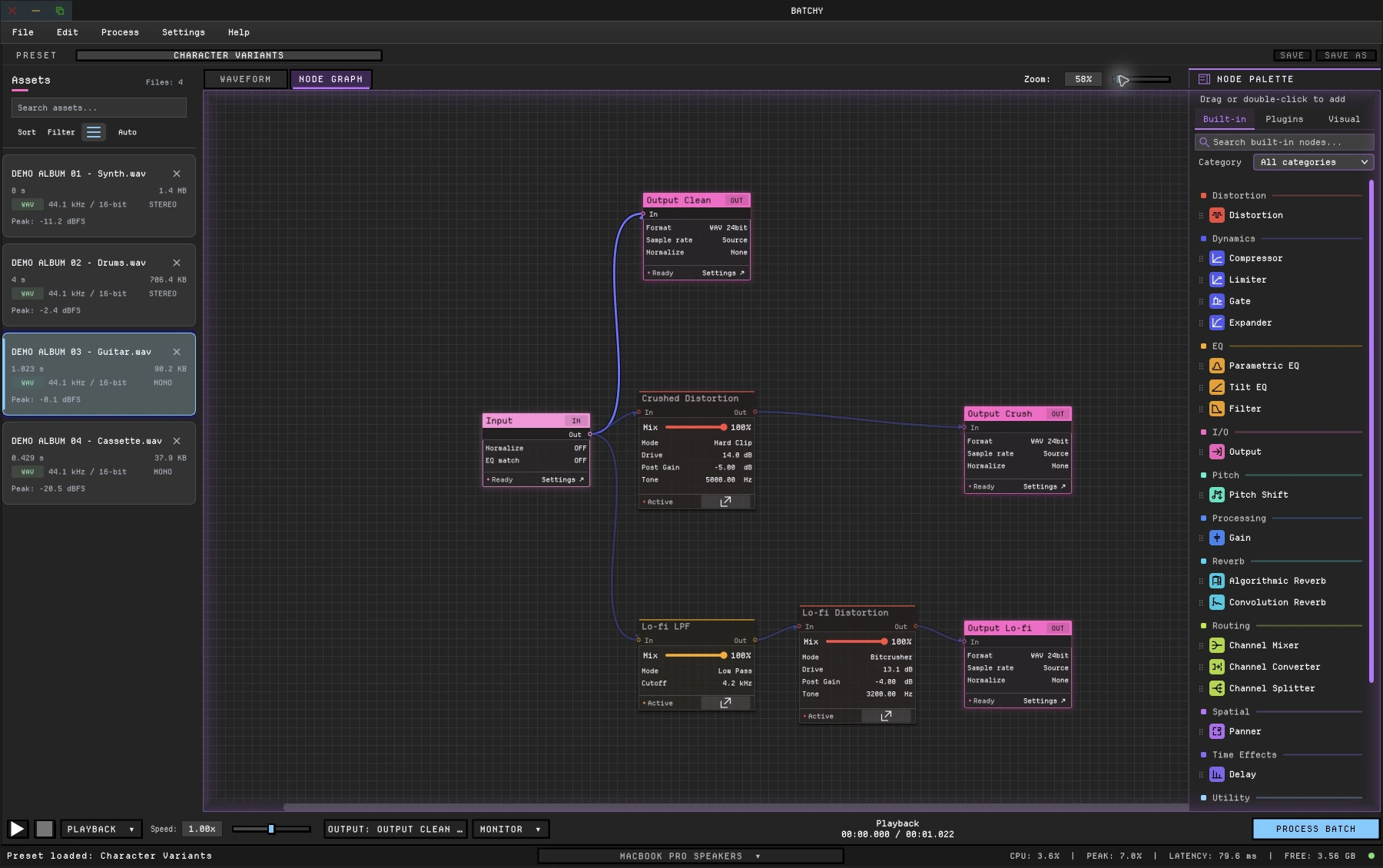
Drop in built-in processors and your plugins. Split the signal into parallel paths, blend them back in a Channel Mixer, or end each path in its own named output.
Play any file through the graph and switch between the live signal and the processed result. Check it on the waveform, the spectrogram and the meters.
 (enlarge)
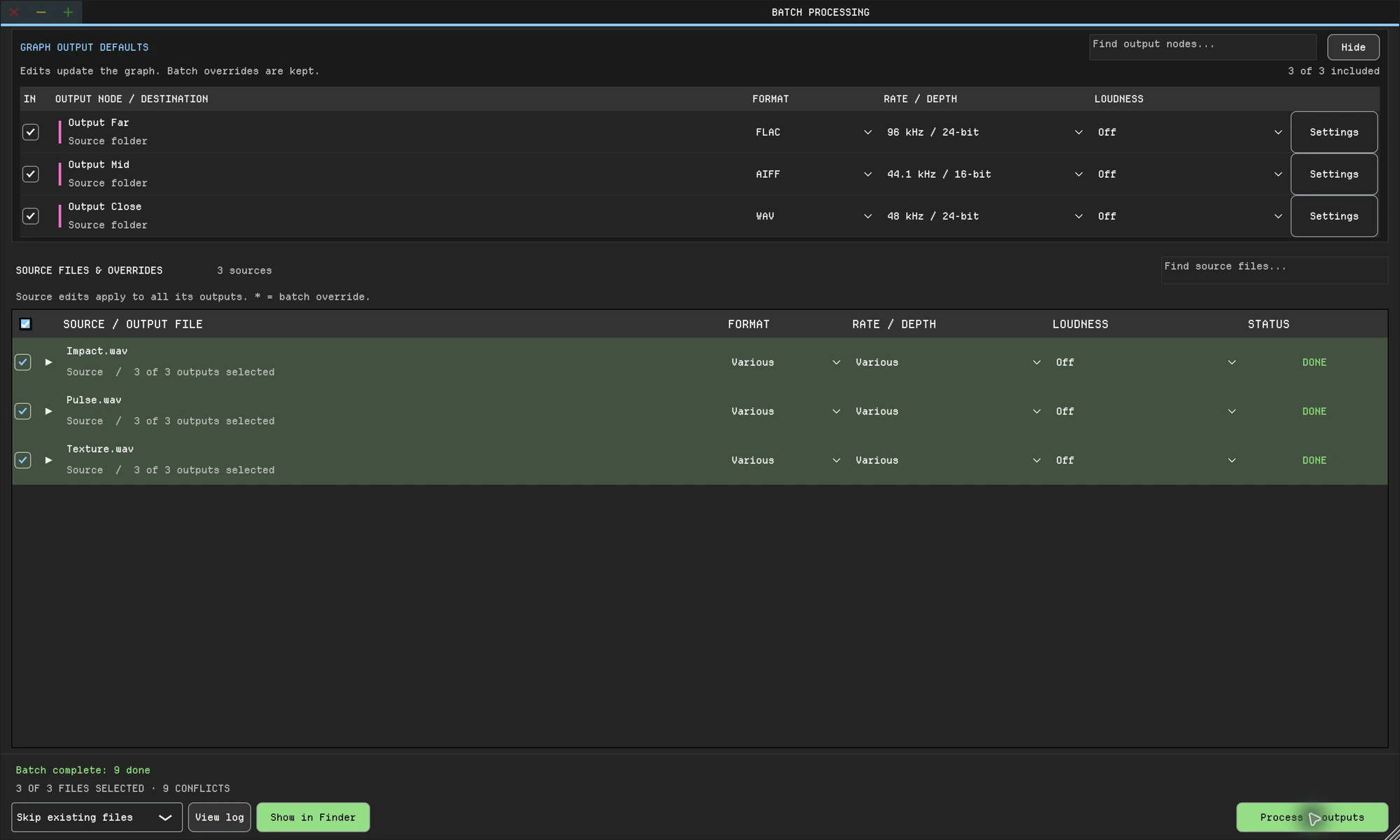
Point it at a folder. Every file renders through every branch to every output you named, each with its own format, sample rate, bit depth, loudness target and filename.
One batch job
The batch tools compared below write one processed version of each file per job, sometimes in several formats. Batchy branches the processing, so every output carries its own chain, format and loudness target. One batch job renders every version.
metal_impact_01.wavSource fileOne graph runs on every file in the folder.
metal_impact_01_clean.wavWAV · 24-bit · source ratemetal_impact_01_crush.wavWAV · 24-bit · source ratemetal_impact_01_lofi.wavWAV · 24-bit · source rate03_night_drive_mix.wavAlbum mix03_night_drive_master.wavWAV · 24-bit · −14 LUFS target03_night_drive_archive.flacFLAC · 24-bit · source rate03_night_drive_vinyl.wavWAV · 24-bit · source rateListen
Rendered from the demo graphs with the Batchy command line. Switch between the dry source and the processed render without losing your place.
Clips are level-matched, so you hear the processing rather than a level change. Press A to switch while a player has focus.
Built around your work
Branch one recording into clean, crushed and lo-fi versions with distortion, pitch, filtering, convolution or your own plugins. Cut and layer an impact in the waveform before you branch. Batchy renders every branch for every file in the library.
 (enlarge)
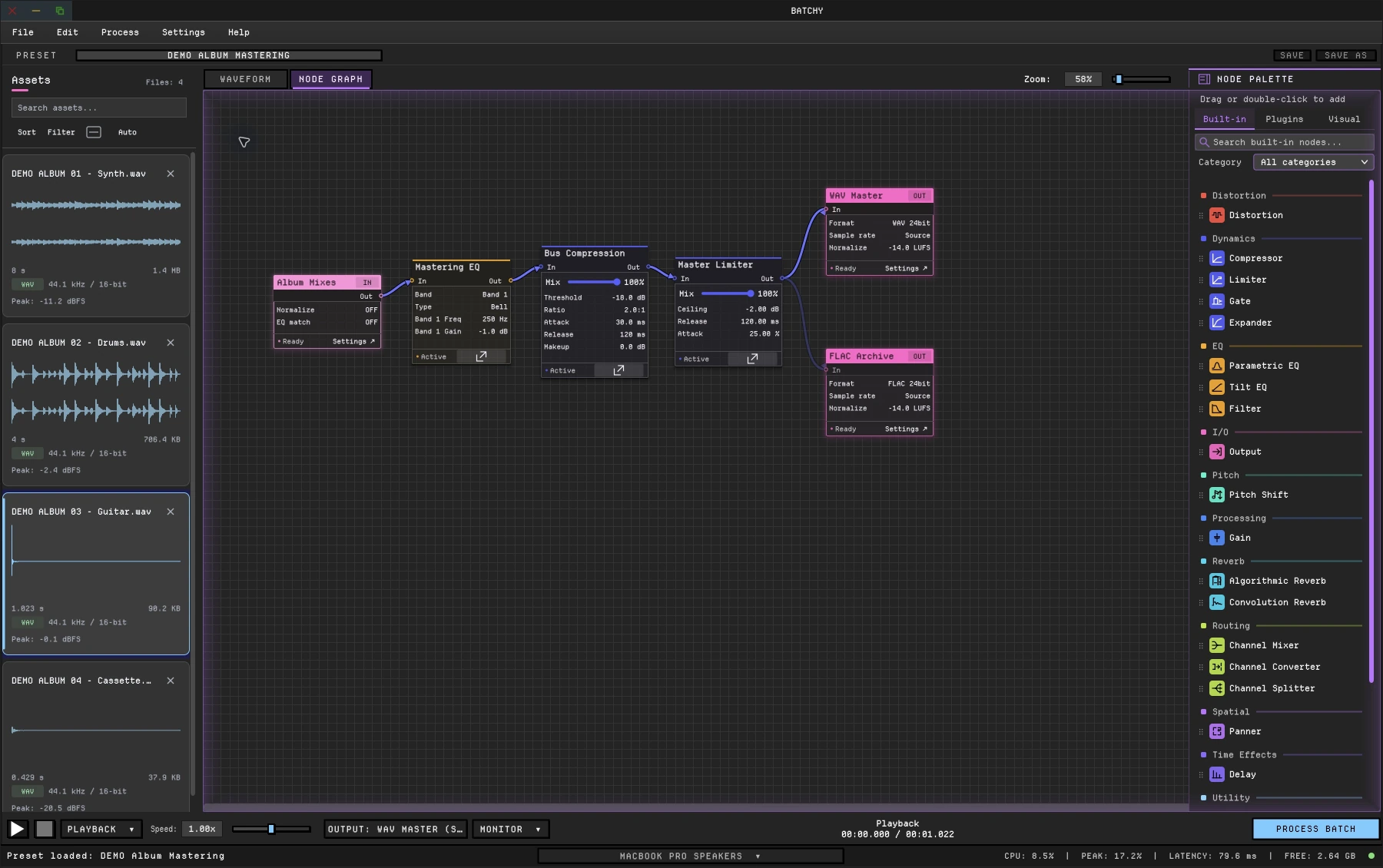
Audition one mastering chain on every track. Branch it for a streaming master with your LUFS target, a FLAC archive and a vinyl pre-master with more headroom, then render the album in one batch job.
 (enlarge)
Cut the gaps, crossfade the joins and silence a cough in the waveform. Then run one voice chain and render WAV and MP3 with your loudness target.
 (enlarge)
Engine-ready exports with per-output sample rate, bit depth and channels, plus a command line for your build.
Explore game audio → Audio engineeringPer-output format, sample rate, bit depth, loudness target and filename templates for every client delivery.
Explore audio engineering →Command line
Save the graph as a preset, then run it on any folder from a terminal, a script or a build step. There is no script language to learn. Presets carry the graph and every output's settings; manual waveform edits stay in the app.
--max-threadsBatchy --batch-process \
--input /audio/incoming \
--preset /presets/auto_process.batchyfx \
--output-dir /audio/processed \
--render-report /audio/reports/latest.json \
--fail-fastEditors, repair suites and plug-in hosts each do part of the job. Among the batch tools compared here, only Batchy renders differently processed, named versions of each file in one batch job.
| Capability | Batchy | WaveLab Pro 13 | Sound Forge 2026 | iZotope RX 12 Standard | Blue Cat PatchWork | Acoustica 8 Standard | REAPER 7 |
|---|---|---|---|---|---|---|---|
| Waveform editing | Yes: non-destructive clip editing in the Live waveform, with undo history | Yes: Audio Editor plus the non-destructive multitrack Audio Montage | Yes: sample-level editing, destructive or event-based non-destructive | Yes: waveform and spectrogram editing, with an undo history | No: a plug-in host (built-in audio player, no editor) | Yes: clip editor with waveform and spectral modes, unlimited undo | Yes: split, trim, fade and crossfade media items on a DAW timeline |
| Branching processing graph in a batch | Yes: branch, blend paths in a Channel Mixer, split by band or channel | No: one linear plug-in chain per batch (or each file’s own Master Section preset) | No: one ordered list of effects per job | No: modules in series | Parallel chains; no batch mode | No: one Processing Chain, processors in series | Partial: one FX chain per batch; FX in it can run in parallel, summed to one output |
| Several formats per file in one batch job | Yes | Yes | Yes | One format per batch (RX 12 guide) | No batch mode (the standalone app records WAV in real time) | No: one target file format per batch | One format per batch run (a second format is documented only for project renders) |
| Differently processed versions per file from one batch job | Yes: every output has its own processing, loudness target, format and filename | No: each input uses one chain; output formats share that processed result | No | No: one module chain per batch | No batch mode | No: one Processing Chain and one target format per batch | No: one FX chain per batch run (projects can render tracks x regions via the Region Render Matrix) |
| Audition before rendering | Yes: switch between live and processed playback | Partial: previews a 2–59 s processed excerpt of any file | Partial: preview in the editor | Partial: preview in the editor | Yes: real-time plugin host | Partial: editor playback runs through the Processing Chain in real time | Partial: FX play in real time in a project; no batch-converter preview documented |
| Plugins in a batch | VST3 on macOS and Windows; AU on macOS | VST3 and VST2; no AU | VST2 and VST3 | VST3 and VST2 on Windows; AU and VST3 on macOS (VST2 too, with Rosetta or an Intel processor) | No batch mode (hosts VST, VST3 and AU) | VST and VST3; AU on macOS (plus built-in processors) | VST2, VST3, LV2, CLAP and JSFX; AU on macOS, DX on Windows |
| Loudness targets in a batch | LUFS (EBU R128), RMS or peak; −1 dBTP true-peak safety on LUFS and RMS | Yes: EBU R128 with true peak | Normalize to LUFS with a true-peak limit in the editor; not documented as a batch step | Yes: Loudness Control (Standard and Advanced) | No batch mode | — not documented | Yes: LUFS, RMS, peak or true-peak normalize, with brickwall true-peak limiting |
| Command line and automation | Yes: CLI with inputs, outputs, presets and JSON render reports | Watch folders controlled from the command line; built-in ECMAScript scripting; ActiveX scripting on Windows | Yes, via scripting: -SCRIPT runs JScript, Visual Basic .NET or C# scripts | — not documented | — not documented | — not documented | Yes: batch conversion from the command line; ReaScript in Lua, EEL or Python |
| Spectral repair and noise reduction | No built-in repair; add repair plugins to the graph | Yes: spectral editing, error correction, RestoreRig (DeNoiser, DeClicker, DeBuzzer) and DeReverb | Yes: click, crackle and clipping repair, DeHisser and broadband noise reduction | Yes: Spectral Repair, Spectral De-noise and a full set of repair modules | No built-in repair tools; hosts third-party plug-ins | Yes: spectral editor with Retouch; DeClick, DeClip, DeHum 3, DeNoise Lite (full DeNoise 3 in Premium) | Partial: non-destructive spectral editing of items; noise reduction with ReaFir |
| Recording | No | Yes: in the Audio Editor, and several montage tracks at once | Yes: up to 32 channels at once, with automatic record start | Yes: up to two channels at a time | Standalone app records its output to WAV (up to 16 channels) | Yes, including timer recording | Yes: multitrack audio and MIDI recording |
| Multitrack timeline | No: one file at a time | Yes: Audio Montage, a non-destructive multitrack environment | No: single-file editor; Boris FX says it “does not function as a DAW” | No: one file per tab; Composite view bulk-edits up to 32 files, “not intended for mixing” | No: a plug-in host, no timeline | Yes: multitrack sessions (Standard handles stereo files) | Yes: full DAW, no track-count limit |
| Platforms | macOS and Windows, on one license | macOS and Windows | Windows 11 only | macOS and Windows | macOS and Windows | macOS and Windows; Linux in public beta | Windows, macOS and Linux |
| Free trial | 7 days; email required, no payment | Yes: 60 days, all features; Steinberg ID required | Yes: 15 days, fully functional, no credit card needed | 7 days, through the iZotope Pro subscription ($25/mo), which includes RX 12 Standard | Demo: up to 5 instances; effect bypassed for half a second every minute | Yes: 30 days, fully functional, no credit card required | Yes: 60 days, full functionality, “no strings attached” |
| Price | One-time: $149. All 1.x updates included. | $499.99 suggested retail (perpetual) | From $24.95 a month or $299.95 perpetual | $399 to buy, or $25/mo in iZotope Pro; Advanced $1,399. Elements ($99) has no batch processing | $99 | $149 perpetual (Premium $299, Ultimate $449) | $60 discounted or $225 commercial license; updates through v8.99 |
As of October 2026, from each vendor’s current documentation. “—” means not documented. PatchWork is included as the plugin-chaining alternative: a plugin host (plugin or standalone app) with no batch mode of its own; the standalone app records its output in real time. REAPER’s batch cells describe its Batch File/Item Converter; its project renderer can do more. Prices are US list prices. Sources: WaveLab Pro: the WaveLab Pro 13 manual and the WaveLab 13 announcement; Sound Forge: the Sound Forge 2026 online help and the pricing page; iZotope RX: the RX 12 user guide and the RX Standard and RX Advanced pages; Blue Cat PatchWork: the PatchWork manual and product page; Acoustica: the Acoustica 8 help and the product page; REAPER: the REAPER user guide and the feature overview.
WaveLab is a trademark of Steinberg Media Technologies GmbH. Sound Forge is a trademark of Boris FX. iZotope and RX are trademarks of iZotope, Inc. PatchWork is a product of Blue Cat Audio. Acoustica is a product of Acon Digital AS. REAPER is a product of Cockos Incorporated. Batchy & Friends is not affiliated with these companies.
Everything in one license
One-time purchase, not a subscription.
Secure checkout · License key emailed instantly
Download 7-day free trialYes. VST3 on macOS and Windows; AU on macOS. Third-party plugins are separately licensed.
Yes. In the Live waveform you can split, trim, move, cut, copy and paste, crossfade, fade, change clip gain, reverse, silence a selection and layer audio with Paste Over, with full undo history. Edits belong to the file and carry into every output you render from the app. Batchy does not record audio.
Yes. Download Batchy and select Start 7-day free trial on the welcome screen or in Manage License. Email required to start; no payment required. Downloading does not start the trial. A paid license is required after seven days.
macOS 12+ on Intel or Apple Silicon, or Windows 10/11 (64-bit). One license covers two machines.
WAV, AIFF, FLAC, MP3 and OGG, on macOS and Windows. Each output sets its own sample rate (22.05, 44.1, 48, 88.2, 96 or 192 kHz) and bit depth (16 or 24-bit, or 32-bit float in WAV).
All 1.x updates are included with your license. A future major version, such as Batchy 2, is a separate product.
No. Use your DAW for recording, multitrack sessions and mixing. Batchy edits and processes files and delivers every version. It has no built-in noise repair; add your repair plugins to the graph.